
TECHDADSLIFE.COM | 3D Printing
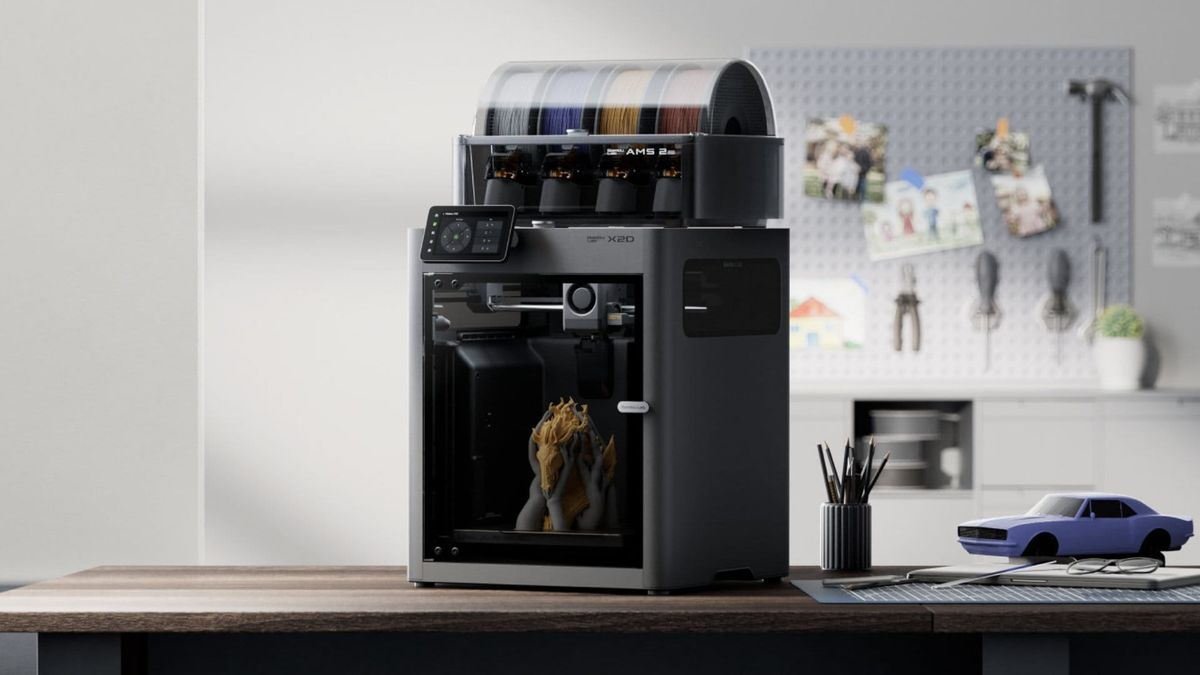
It arrived on April 14th, 2026, and my notifications went off like a smoke alarm. The Bambu Lab X2D had been rumoured for months - and when the announcement finally dropped, it did not disappoint. This is Bambu’s most ambitious machine to date, and it is asking a pointed question at everyone who already owns a P2S: is it time to upgrade?
The short answer: maybe. Let me explain why.
What Is the Bambu Lab X2D?
The X2D is Bambu Lab’s new flagship enclosed desktop printer, sitting above the P2S in both price and capability. It launched at £569 standalone and £769 for the AMS 2 Pro Combo (multi-material). In the US, that is $649 and $899 respectively.
On paper, the specs are a step forward across almost every metric. But what makes the X2D genuinely interesting is not just the numbers. It is the engineering decisions behind them.
The Dual Nozzle System
The headline feature is a dual nozzle setup: a primary print nozzle and an auxiliary nozzle. This is not the same as a dual extruder in the traditional sense. The auxiliary nozzle handles material purging during colour changes more efficiently than the P2S, which means less waste material and cleaner transitions when printing with multiple filaments. If you do a lot of multicolour printing, this alone is worth knowing about.
Build Volume and Speed
The X2D gives you 256 x 256 x 260mm - marginally taller than the P2S (256 x 256 x 256mm), which matters if you print tall objects. Speed is rated comparably to the P2S at the high end, but Bambu has refined the motion system with a PMSM servo motor for improved torque and positioning accuracy. In practice, this means fewer artefacts on fast prints.
Temperature and Enclosure
The X2D reaches 300°C at the nozzle and 65°C at the chamber. That combination opens up engineering-grade materials that the P2S struggles with - think PA-CF (carbon fibre nylon), PC, and high-temp PETGs. If you are still printing mostly PLA and PETG, you will not notice the difference. If you want to push into functional parts territory, the X2D’s thermal capability matters.
Sensors and Air Quality
Bambu fitted the X2D with 31 sensors monitoring everything from vibration to humidity. The triple HEPA filtration system is a genuine upgrade - it captures ultrafine particles more effectively than the P2S’s enclosure filtration, which is important if your printer lives in a room where people spend time.
The P2S: Still Brilliant, Now Better Value
Before the X2D landed, the P2S was the printer I recommended to anyone with a serious interest in 3D printing who did not want to mess about with bed levelling, firmware tweaks, and the general pain of budget machines.
It is still all of those things. And at £549 standalone (or even the discounted bundles available now that the X2D has launched), it represents outstanding value.
The P2S brought 70% more extrusion force compared to its predecessor, a new-generation touchscreen, and Bambu’s famously polished slicing software. For 99% of home printing projects - toys, functional household parts, cosplay props, miniatures - the P2S is not a limiting factor. Your skill and your design are the limiting factors.
Head to Head: X2D vs P2S
| Bambu Lab X2D | Bambu Lab P2S | |
|---|---|---|
| UK Price (standalone) | £569 | £549 |
| AMS Combo | £769 | £799 |
| Build Volume | 256 x 256 x 260mm | 256 x 256 x 256mm |
| Max Nozzle Temp | 300°C | 300°C |
| Chamber Temp | 65°C | 65°C |
| Nozzle System | Dual (main + auxiliary) | Single |
| Motor Type | PMSM Servo | Stepper |
| Sensors | 31 | 16 |
| Filtration | Triple HEPA | Standard enclosure |
| Best For | Multicolour, engineering materials | Everyday printing, value |
So Who Should Buy Which?
Buy the X2D if:
- You do a lot of multicolour printing and want cleaner purges with less waste
- You want to print engineering materials like PA-CF, PC, or high-temp nylon
- You are building a workshop or makerspace setup and want the best tool available
- The £20 price difference between standalone models feels irrelevant to you
Stick with the P2S (or buy one now while prices are good) if:
- You are a hobbyist printing PLA, PETG, and standard materials
- You want a world-class printer without paying flagship prices
- You are just getting into serious desktop FDM printing and want outstanding without complicated
Look at the P1S if:
- Budget is the primary constraint. The P1S has dropped to around £399 and is still a remarkable machine - just with an older generation touchscreen and slightly less extrusion grunt than the P2S.
The Tech Dad Verdict
| What I Think |
|---|
| I have had a P2S in the garage for several months and it is one of the best purchases I have made for the house. It just works, reliably, every time, and the Bambu app ecosystem - particularly MakerWorld for finding models - makes the whole experience genuinely accessible. The X2D is an impressive step forward, and if I were buying for the first time today, I would probably stretch to it. The dual nozzle and improved filtration are meaningful upgrades for a serious home user. But my P2S is not going anywhere. Bambu has set a high bar - the X2D just raises it slightly further. |
Both machines are available direct from Bambu Lab and through Amazon UK. Given the AMS 2 Pro Combo pricing, the P2S bundle is actually £30 cheaper than the X2D combo if multicolour printing is what you are after - worth factoring in.
If you are wondering where to start with models for either machine, take a look at MakerWorld - Bambu’s own model community, which has quietly become the best place on the internet to find ready-to-print files. I have a full write-up on it coming shortly.
Have you picked up the X2D? Or still happily printing on a P1S or P2S? Drop your thoughts in the comments or find me on X / Twitter .
A Note From the P2S Owner’s Chair
I have had my P2S running in the garage for several months now, and there is one thing that the spec sheet comparison does not capture: how much the Bambu ecosystem as a whole changes what 3D printing feels like at home.
Before the P2S, I had a Creality machine that required levelling, tweaking, occasional firmware adventures, and a general tolerance for things not quite working on the first attempt. The P2S changed that completely. First print after setup: worked. Twenty-third print after setup: also worked. It is not an exciting story, but that consistency is genuinely the product.
What I have noticed over the months is that the limiting factor is never the printer. It is always the design, the filament choice, or my own understanding of what is actually printable. The P2S has essentially removed the machine from the equation, which is exactly what a tool should do.
The X2D, from everything I have seen, does the same thing but with more ceiling on materials and more precision on multicolour output. The dual nozzle system reducing purge waste is the feature I keep coming back to. If you print multicolour regularly, the waste from purge towers adds up - filament and time both. Reducing that is not a marginal improvement.
What I would tell anyone buying their first Bambu:
Do not over-specify for where you are right now. The P1S at around £399 is an exceptional first serious printer. The P2S is the right call if you know you want the extra extrusion strength and refinement. The X2D makes sense if multicolour work or engineering materials are a genuine goal, not just a possible future one.
Most people printing toys, organisers, household parts, and cosplay props on PLA and PETG will be more than happy on a P1S or P2S for years. The X2D’s advantages only become relevant once you are pushing the limits of the tier below it - and most home users take quite a while to get there.
The one thing I would spend money on immediately regardless of which machine you buy: a solid filament dry box or a proper desiccant storage system. Wet filament is the cause of more failed prints than any hardware limitation. Get the storage right first and the printer choice becomes much less fraught.
I will have a full P2S long-term review published shortly - including the prints that went wrong and why, which is more useful than a list of the ones that went right.
